Home Office Work Zones: How to Divide a Room by Task
Divide your office into four physical zones (desk, reference, supply and equipment) with a simple sketch and a round of sticky notes, then move each item to the zone where it is used.
At a glance
What you need
- Sheet of paper and a pencil
- Tape measure
- Sticky notes in three colors
- Two or three empty boxes for moving items
When everything in an office is stored wherever it happened to land, the room behaves like one large pile. You stand up for a stapler, cross the room for an envelope and move a ream of paper to reach a folder. Setting up home office work zones fixes this by giving each kind of activity its own area and storing things in the area where they are used.
The method below needs a sheet of paper, a pencil and about two hours. It works the same way in a full room, a corner of a bedroom or a desk shared with someone else; only the distances shrink.
The four zones
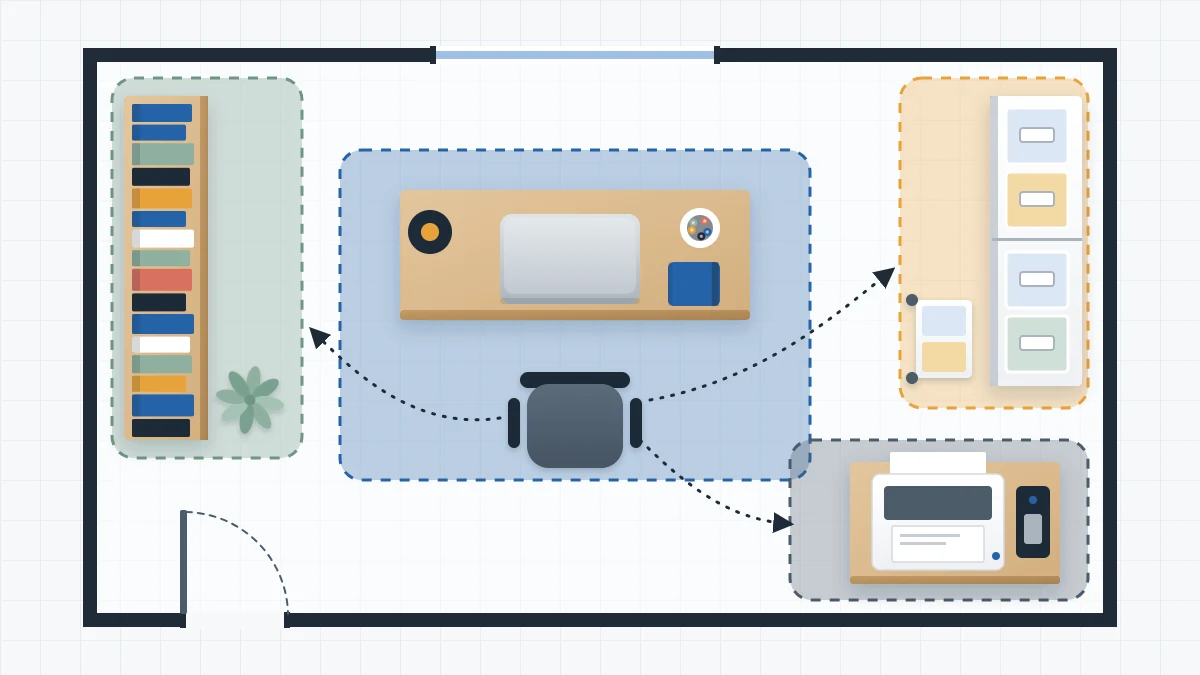
Most home offices need four zones, defined by how far each is from your chair.
| Zone | Distance from the chair | What belongs there |
|---|---|---|
| Desk zone | Arm’s reach while seated | Daily tools: computer, pens, current notebook, one paper tray |
| Reference zone | A step or two, or a swivel of the chair | Files, binders, books and manuals you consult |
| Supply zone | Across the room or in a closet | Stock and refills: spare paper, envelopes, backup pens |
| Equipment zone | Wherever it fits with clear space around it | Printer, scanner, shredder, charging spot |
What to gather
- A sheet of plain or squared paper and a pencil
- A tape measure
- Sticky notes in three colors, or one color and a pen
- Two or three empty boxes for moving things between areas
Step by step: map the room and move things
- Sketch the room from above. It does not need to be to scale. Draw the walls, door, window, desk, chair and every piece of storage furniture. Mark where the door swings and where you walk.
- Mark what is fixed. Note the things that cannot easily move, such as a radiator, a built-in closet or the spot where the desk has to stand to reach a network or phone socket. Zones are planned around these.
- Tag items by frequency. Walk the room with the sticky notes. Put one color on anything used daily, a second on anything used weekly and a third on anything used rarely. Tag containers as a whole when everything inside shares a frequency.
- Draw the four zones on the sketch. Circle the desk and what you can reach from the chair. Circle the nearest shelf or drawer unit as the reference zone. Choose the farthest or least convenient storage for supplies. Give equipment a surface of its own.
- Compare tags with zones. Look for mismatches: a daily-tagged item outside the desk circle, or a rarely-tagged box inside it. List each mismatch on the back of the sketch.
- Move the mismatches. Start by taking rarely used things out of the desk zone, which frees space. Then bring the daily items in. Use the boxes to carry groups together so nothing is set down halfway.
- Live with it for a week. Leave the sticky notes on. If you find yourself walking to the same shelf several times a day, that item is in the wrong zone. Move it and update the sketch.
If the tagging step shows that a large share of the room is never used at all, the room needs sorting before zoning. The guide on where to start organizing a home office covers the order for that.
Setting up each zone
Desk zone
Keep this zone small on purpose. A cup of working pens, the notebook in use, one tray for active paper and whatever sits in the top drawer. If an item is not used on most working days, it belongs one zone out.
Reference zone
This zone holds things you read or look up: current files, binders, manuals and books. A low bookcase beside the desk, a drawer unit with hanging folders or the shelf behind your chair all work. Put the items consulted weekly between hip and eye height, and see the guide to arranging office shelves by reach and use for the details of each shelf.
Supply zone
Stock does not need to be near you; it needs to be together. One cabinet, one shelf of lidded boxes or one closet shelf is enough. Keeping all refills in a single place also tells you at a glance what you are running low on.
Equipment zone
Group the machines so their paper, ink and cables can be stored beside them. Leave the clearance each device manual asks for and do not block vents. The guide to setting up a printer station shows how to arrange the paper and supplies around it.
Tip
Test a zone boundary from the chair. Sit down, stretch out one arm and sweep it in an arc. Everything your hand passes over is the desk zone. Anything beyond that arc is reference at best, however close it looks.
Adapting the zones to a corner or a small room
In a tight space the zones stack vertically instead of spreading across the floor. The desk surface and one drawer are the desk zone. A shelf or a drawer unit directly beside the desk is reference. Supplies leave the corner entirely and go to a closet or cabinet elsewhere in the home, with only a small working set kept at the desk.
Equipment can leave too. A printer used twice a month does not need to stand in the corner where you work. For more ways to fit storage into a tight footprint, see the guide to organizing a small home office.
Adapting the zones to a shared space
When two people use the room, each person gets a desk zone of their own, even if that is half of one long surface. The reference zone can be split by shelf, one each. Supplies and equipment are shared, so place them where both people can reach them without walking behind the other’s chair.
If the desk itself is shared at different times of day, the desk zone becomes portable: each person’s daily tools sit in a caddy or tray that lifts off and goes on a shelf when they finish.
Signs the zones are right
- You can do an ordinary day’s work without standing up for a tool.
- Nothing has to be moved out of the way to reach something else.
- Refills are found in one place on the first try.
- The desk can be cleared in a couple of minutes because every item on it has a home within reach.
Frequently asked questions
How many zones does a home office need?
Four cover most rooms: a desk zone for daily tools, a reference zone for files and books, a supply zone for stock and refills, and an equipment zone for the printer and charging. A very small office can merge reference into the desk zone and move supplies and equipment to another part of the home.
Can I set up work zones in a room that is also a guest room?
Yes. Keep the desk and reference zones compact along one wall and place supplies in closed storage such as a cabinet or lidded boxes, so the office part of the room can be tidied away quickly. Equipment used only occasionally can live in a closet between uses.
How do I know an item is in the wrong zone?
Watch what you fetch. If you stand up or cross the room for the same thing several times a day, it belongs closer to the chair. If something within arm's reach has not been touched in weeks, move it outward to the reference or supply zone and give the space to something you use.