How to Organize a Printer Station: Paper, Ink and Cables
Give the printer a stable surface with the clearance its manual asks for, then store paper flat below it, spare ink in one box, and add a tray for printouts and a folder for scrap.
At a glance
What you need
- Printer manual
- Tape measure
- Low cabinet, bookcase or sturdy cart
- Lidded box for paper
- Small box for ink or toner
- Letter tray and a folder
- Soft reusable cable ties
A printer rarely gets a proper home. It sits on the floor, on a chair or on the end of the desk, with reams of paper leaning against it and cartridges somewhere in a drawer. A printer station puts the machine and everything it consumes in one place, so loading paper or changing ink is a matter of reaching down, not searching.
Setting one up takes about an hour. You need a steady piece of furniture, two or three containers and the printer’s manual.
What to gather
- The printer manual, printed or on screen, open at the setup or placement page
- A tape measure
- A cabinet, low bookcase, sturdy cart or table for the printer
- A lidded box for opened paper
- A small box for ink or toner
- One letter tray and one folder
- Two or three soft reusable cable ties
Choose the surface and position
The printer needs a surface that is stable, level and large enough for its whole base, with no corner overhanging. Check the manual for the footprint and for the clear space it asks for around the machine, then measure your furniture against both.
- Leave the stated clearance. Printers draw air through vents and move paper in and out. Do not push the machine tight against a wall or into a closed cubby, and do not block the vents with boxes, books or a dust cover while it is in use.
- Allow for moving parts. Open every tray, flap and lid fully and measure the printer at its largest. The output tray, the rear paper feed and the scanner lid all need room.
- Choose furniture meant for the load. Check the maker’s stated limit for a shelf, cart or cabinet top before placing a printer on it, and prefer a low, wide piece to a tall narrow one.
- Keep it off the floor. Floor level collects dust and makes every paper change a crouch.
- Pick a spot away from direct sun and heaters.
The printer does not have to stand beside your chair. Unless you print many times a day, it belongs a few steps away with other equipment, as described in the guide to home office work zones.
Step by step: build the station
- Unplug the printer and clear the area. Switch it off as the manual directs, unplug it and lift it aside, with help if it is heavy. Remove everything stacked around it.
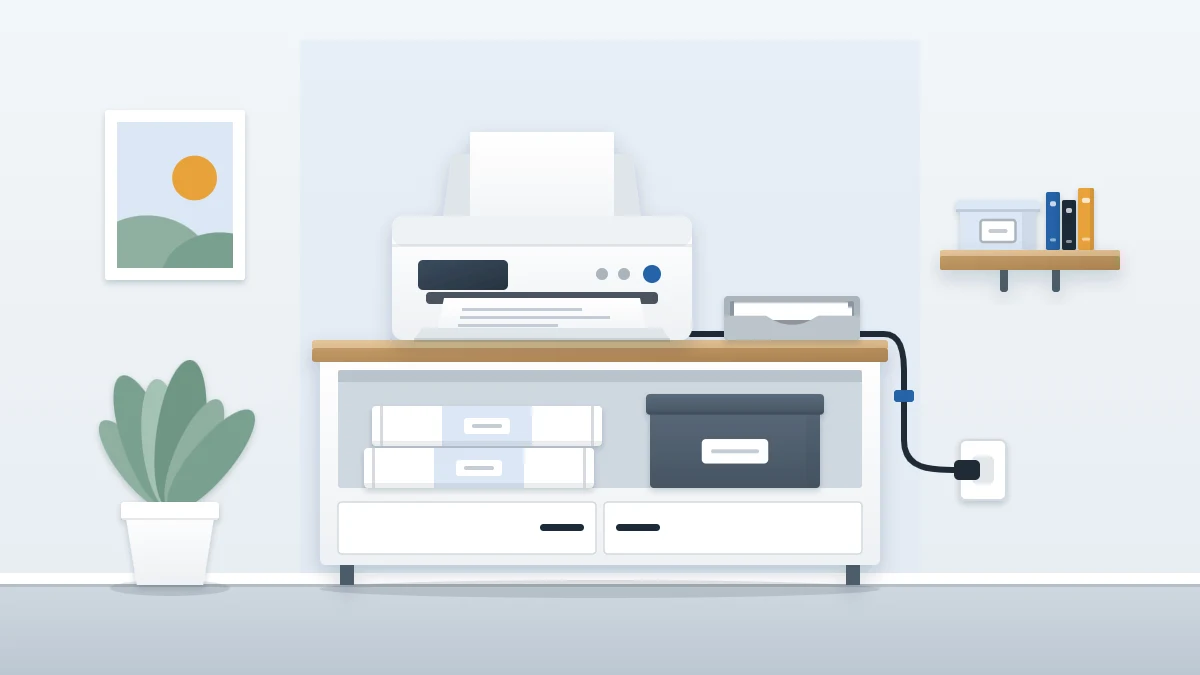
- Place the printer. Set it squarely on the surface with the clearance the manual gives. Open the trays to confirm they move freely.
- Put the paper directly below. Use the shelf or cabinet space under the printer for paper, laid flat. Keep unopened reams in their wrappers; move an opened ream into the lidded box.
- Box the ink or toner. Collect every spare cartridge into one small box, still in its sealed packaging, and place it beside the paper.
- Add the output tray and scrap folder. Set a letter tray next to the printer for finished printouts and stand a folder behind it for scrap paper.
- Bundle the manual and cables. Put the printed manual, the warranty leaflet and any spare data cable in one large envelope or zip bag, labeled with the printer’s model name, and keep it in the ink box or beside it.
- Reconnect and tidy the visible cords. Plug in, then gather the slack as described below.
Storing paper so it feeds cleanly
Paper that has curled or picked up moisture is a common cause of misfeeds, so how you store it matters.
- Flat, never on edge. Lay reams flat on the shelf with nothing leaning on them.
- Wrapped or boxed. The wrapper keeps out dust and damp. Once it is torn open, a lidded box does the same job.
- A short stack. Keep two or three reams at the station and the rest with your supply stock.
Storing ink and toner
Keep spare cartridges in their original sealed packaging until the moment you fit them, and store them as the packaging directs, away from heat and direct sun. One box holds them all, which gives you a single place to check before ordering.
- Write the printer model on the box. Cartridges for different machines look alike.
- Put the newest at the back so the oldest is used first.
- Deal with empties at once. Many makers and local recycling points take used cartridges. Put the empty one in the bag the new one came in and place it by the door, not back in the box.
If you buy more supplies than this one box will hold, keep the overflow with the rest of your stock; the list of office supply storage ideas includes a refill box that suits it.
A tray for printouts and a folder for scrap
Printed pages left in the output slot get mixed with the next job or slide to the floor. A letter tray beside the printer gives them a place to wait.
Misprints and single-sided sheets that can be reused go in the scrap folder, blank side facing the same way. Before a sheet goes in, check what is printed on it: anything showing personal details goes to the shredder instead.
Tidying the cords
Deal only with the visible length of the power cord and any data cable. Unplug before handling them. Gather spare length into a loose loop behind the printer and fasten it with a soft tie, never pulled tight or bent sharply, and keep the cords clear of the paper path and out of walkways. For routing along furniture, see the guide to desk cable organization.
Safety note
Follow the manufacturer’s instructions for powering the printer; some manuals ask for it to be plugged directly into a wall outlet. Do not overload an outlet or power strip, and never plug one power strip into another. Keep cords out from under rugs and away from heat, and stop using and replace any cord that is frayed, cracked or unusually hot. If the best spot for the printer has no outlet nearby, adding a new outlet is a job for a licensed electrician.
Adapting the station
No spare furniture: a sturdy shelf of an existing bookcase can hold a small printer if the manual’s clearance fits and the trays open fully. Put the paper on the shelf below.
A printer that must share the desk: place it at the far end on your non-writing side, and move the paper and ink to the nearest drawer or a box under the desk so only the machine itself takes up surface.
Frequently asked questions
Where should a printer go in a home office?
On a stable, level surface that fits its whole base, off the floor, away from direct sun and heaters, with the clear space its manual asks for around the vents and trays. Unless you print many times a day, a spot a few steps from the desk is better than the desk itself.
Can I keep a printer inside a cabinet or closet?
Only if the space gives the clearance the manual specifies and the vents are not blocked. Open the door while the printer is running, and check that every tray and lid opens fully. A closed cubby with no air around the machine is not suitable.
How should spare ink cartridges be stored?
Keep them in their original sealed packaging until you fit them, and store them the way the packaging directs, away from heat and direct sun. Put all spares in one labeled box near the printer, with the newest at the back so the oldest is used first.